Hi, I'm Matei. Three-ish years ago I found an old Pentium tower nobody
wanted and put Home Assistant on it, and it kind of snowballed from
there — now it's home automation, a media server, security cameras, the
works.
I'm writing this mostly for me. I genuinely forget how half of this
stuff is wired together within a few months of setting it up — which
service talks to which, why I configured something a weird way, how I
fixed some bug I ran into — so this is the notebook. If you get
ideas out of it too, great.
Currently runningOct 2026
Running: Home Assistant automation
Running: TrueNAS storage
Running: Jellyfin media
Running: Plex media
Running: Radarr films
Running: Sonarr shows
Running: Prowlarr indexers
Running: Frigate cameras
Running: Tailscale network
Running: Bazarr subtitles
Still configuring: Cleanuparr tidying
Running: Profilarr profiles
Still configuring: Home dashboard my build
running still configuring
What's running
Four setups, roughly
Running: Automation
Home Assistant
The first thing I ever self-hosted. Started on that old Pentium PC
on HAOS, and now lives in a VM on the TrueNAS box, with basically
every device in the house wired into it. AirCast is still my
favourite integration, not gonna lie.
Running: Media
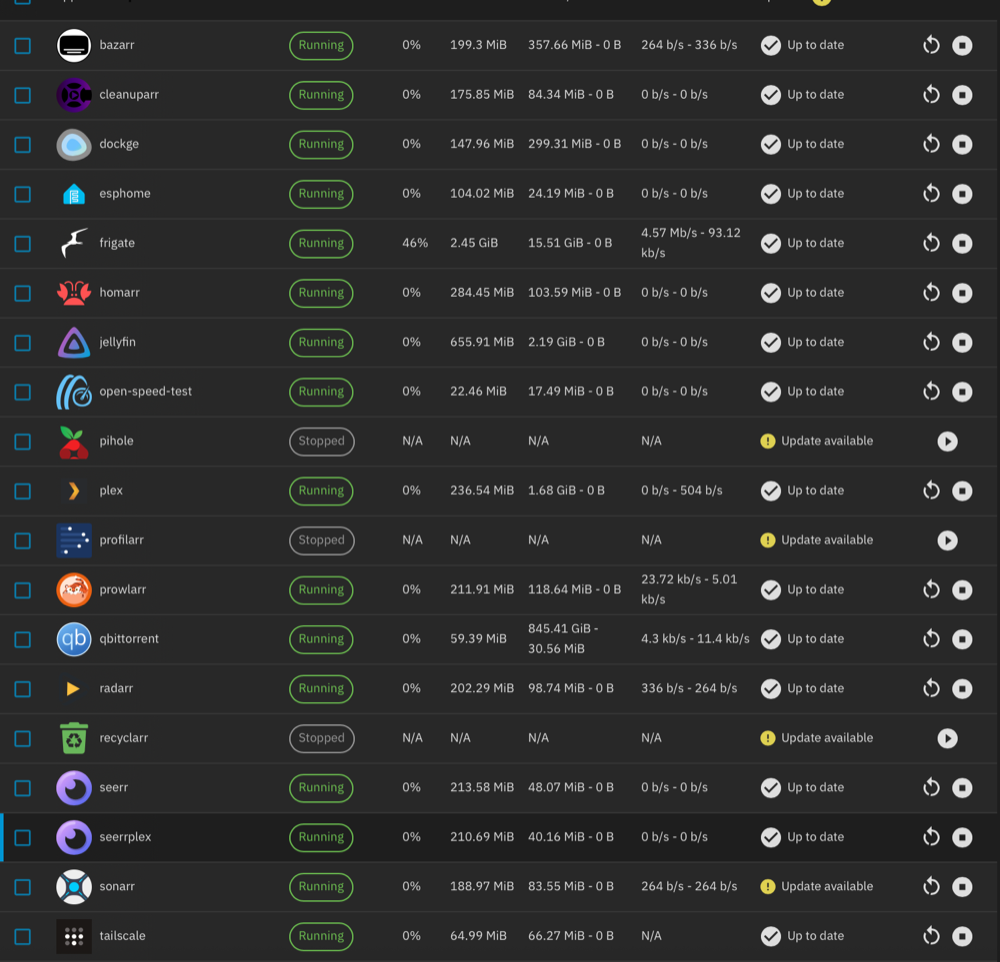
The *arr stack
Tried running Plex on the old Pentium first. Didn't go well, no GPU
and barely any RAM. Once I had the newer tower, TrueNAS could run
everything at once and the whole film/TV pipeline basically runs
itself now. Radarr, Sonarr and Prowlarr just work, Bazarr grabs
Romanian and English subtitles for everything, and Profilarr
handles the quality profiles. Cleanuparr is the last one I'm still
fighting with.
Running: Cameras
Frigate, instead of an NVR
My dad was about to buy a proper NVR box for security cameras. I
told him to give me the money instead and I'd build something
better. It runs Frigate now and can tell the difference between a
car and a person walking up the driveway, which the box he was
looking at couldn't do.
Still configuring: Never finished
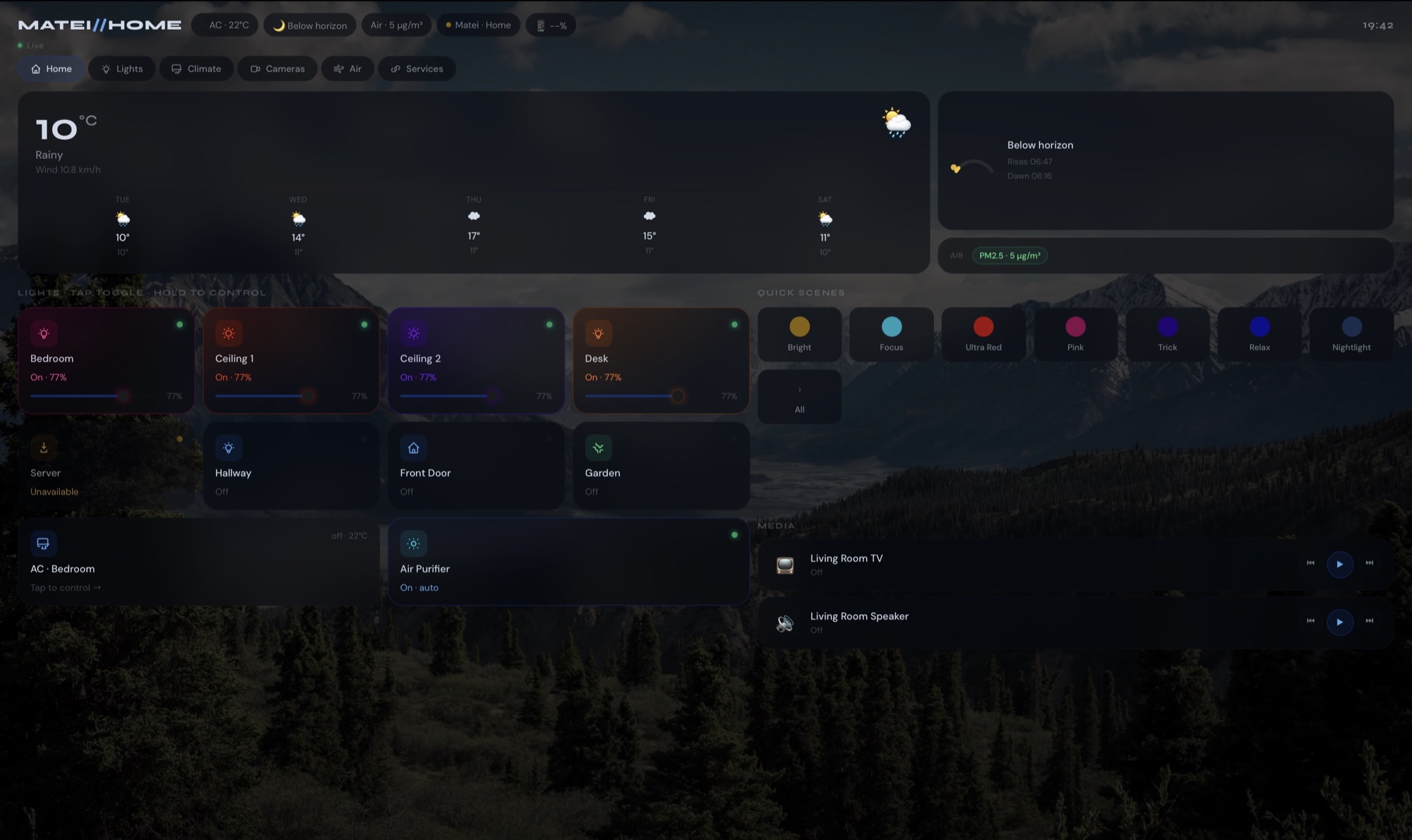
My own dashboard
Got tired of Home Assistant's default dashboards not looking how I
wanted, so I'm rebuilding it in plain HTML, which I had zero
experience with when I started. It talks to HA over WebSocket and
actually works. Getting the layout right is a constant fight though.
How it's wired
One box, two pools
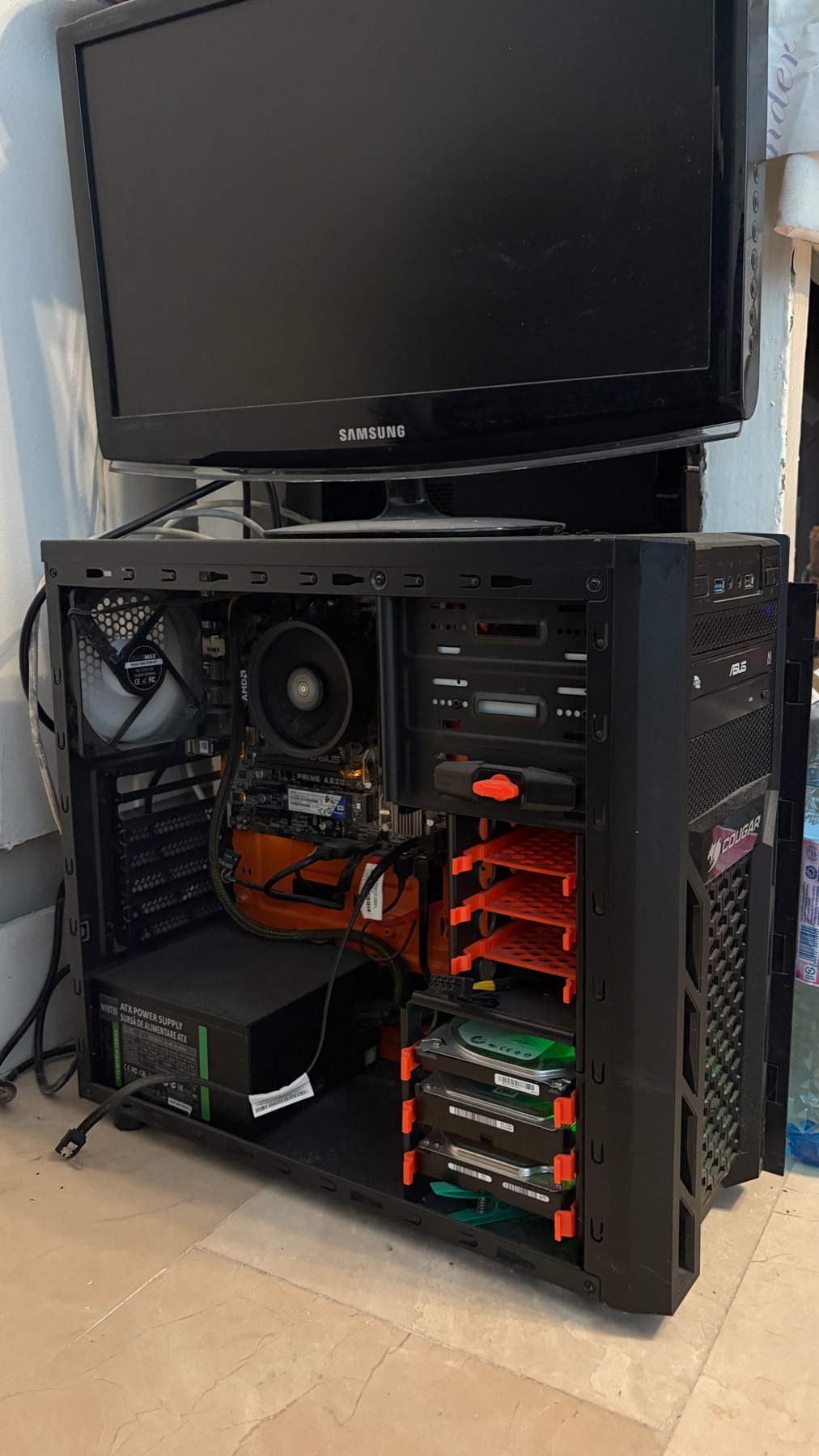
Everything runs on the tower my cousin gave me. This is which service
talks to which, the bit I always forget first.
Arrows point the way requests and files go. Scroll sideways on a phone.
The boxTrueNAS SCALE
CPU
AMD Ryzen 7 1700 8 cores · 16 threads
Board
ASUS PRIME A320M-K
RAM
16 GB DDR4-3000 Corsair Vengeance LPX
GPU
None everything runs on the CPU
Pool
2 × 500 GB HDD, mirror storage + Frigate
temp-pool
1 × 500 GB HDD, stripe films + shows
The temp-pool drive came out of a PC someone left on the side of the
road. Single disk, no redundancy.
Problems I've hit
Field notes
Every problem that's bitten me, what was actually going on, and what
fixed it — written down so I stop re-solving things from scratch.
Tap one to open it, or search for an error message.
No notes match that.
Dashboard
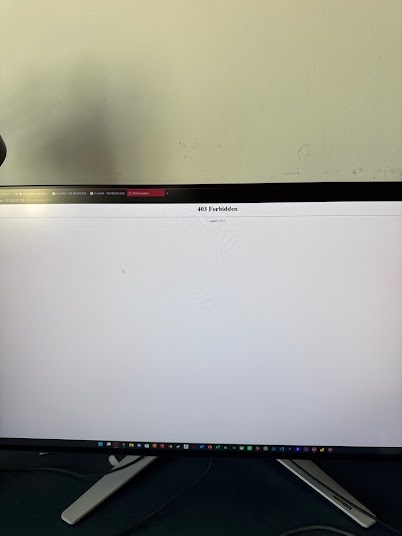
Updating the dashboard throws a 403
Problem
The dashboard is a single HTML file served by an
nginx:alpine container in Dockge, reading from
/mnt/Pool/dashboard. Every so often, after editing the
file and saving it back into that folder, nginx starts throwing:
403 Forbidden
nginx/1.29.8
The 403, in the wild
Why
Saving the file from another machine resets its owner and
permissions, and nginx can no longer read it.
Fix
Folder needs 755 (nginx has to be able to enter it),
the files inside need 644:
I first pulled the camera streams into the dashboard through Home
Assistant. It meant fighting HA's CORS settings, and even when it
worked it was flaky.
Fix
Skip HA for video entirely. The dashboard now talks straight to
Frigate: live view uses go2rtc's MSE stream in a plain
<video> element, and recordings and clips come
from the Frigate API. HA is only used for the things HA is good at
— lights, AC, the air purifier, scenes.
Cameras
Home Assistant couldn't reach Frigate
Problem
Frigate runs in Docker on TrueNAS, Home Assistant runs in a VM on
the same box. HA could not talk to Frigate on its normal LAN
address.
Why
Hairpin NAT. TrueNAS's Docker port forwarding (DNAT) doesn't
handle traffic that leaves the host and comes straight back in, so
the VM's requests to the host's own IP went nowhere.
Fix
Point the HA ↔ Frigate integration at the
Tailscale IPs instead of the LAN ones. Tailscale routes
around the NAT problem completely.
Cameras
Recordings with audio wouldn't save
Problem
Turning on audio for the TP-Link VIGI cameras broke recording.
Why
The cameras send audio as PCM A-law, and that codec isn't allowed
inside an MP4 file, which is what Frigate records to.
Fix
Tell ffmpeg to transcode the audio to AAC when recording:
After moving to Frigate 0.17.0, my old retention config stopped
doing what I wanted.
Why
0.17 replaced the old retain / events
layout with separate settings for continuous recording, alerts and
detections. Most guides online still show the old format.
Fix
Rewrite it in the new structure. Mine keeps about a week:
I wanted to cap the Frigate dataset at around 120–130 GiB so
recordings can't eat the whole pool. Setting the quota just failed.
Why
ZFS won't let you set a quota smaller than what the dataset is
already using.
Fix
Delete old recordings first (or shorten retention and let Frigate
clean up), check usage, then set the quota:
zfs get used Pool/frigate
zfs set quota=130G Pool/frigate
TrueNAS
Installing things directly on TrueNAS doesn't work
Problem
I tried installing Hermes Agent straight onto the TrueNAS host
with its normal installer. It "installed", but nothing would run.
Why
TrueNAS SCALE locks the host down on purpose: / is
mounted read-only and /home is noexec.
The installer drops its binaries somewhere they're not allowed to
execute.
Fix
Don't fight it. Use the app from the TrueNAS catalog (Community
train) and keep its data on the pool at
/mnt/Pool/hermes. Rule of thumb: on SCALE, everything
goes in an app or a container, never on the host.
TrueNAS
App works on the server but not from my laptop
Problem
Deployed the Odysseus app through Dockge. It started fine, but I
couldn't open it from any other device on the network.
Why
Two things. It was only listening on localhost
(127.0.0.1), so it ignored everything that wasn't the
server itself. And Dockge only manages stacks that live inside its
own stacks folder.
Fix
Clone the project into Dockge's stacks path, and change the
listen address to 0.0.0.0 so it accepts connections
from the network.
TrueNAS
AirCast stopped finding my speakers in the HA VM
Problem
After moving Home Assistant into a VM on the TrueNAS box, the
AirCast integration stopped working. It couldn't see any of the
Cast devices on the network, even though the VM itself was online
and everything else in HA was fine.
Why
AirCast finds devices with multicast discovery (mDNS). By default
the VM's network card ignores the guest's requests to receive that
multicast traffic, so the discovery packets never reach Home
Assistant.
Fix
In TrueNAS go to Virtualization → the HA VM → Devices → NIC →
Edit, tick Trust Guest Rx Filters, save and restart the
VM, and AirCast can see the speakers again.
Media
Downloads finish, Sonarr never imports them
Problem
qBittorrent completes the download, Sonarr just sits there and
never moves the file into the library.
Why
Path mismatch. qBittorrent reports where it saved the file using
its container's path. If Sonarr has the same dataset mounted
at a different path, it goes looking in a folder that doesn't
exist for it.
Fix
Make the qBittorrent category save path match the in-container
mount path exactly, and mount the dataset at the same path in both
containers.
Media
Jellyfin showing films I deleted ages ago
Problem
Films I'd deleted long ago were still in the Jellyfin library, and
on top of that no movie had the right title or poster.
Fix
Normal rescans didn't clear the ghosts. What worked was wiping the
library and letting Jellyfin discover everything again from
scratch.
Media
One Seerr can't do Plex and Jellyfin
Problem
I use Plex at home and Jellyfin for remote family streaming over
Tailscale. I wanted one request page for both.
Why
A single Seerr instance can only be connected to one media server
at a time.
Fix
Run two Seerr instances — one for Plex, one for Jellyfin.
Media
Quality profiles were a mess
Problem
Managing quality profiles through Recyclarr meant editing YAML,
and the usual advice is to run separate Radarr/Sonarr instances for
4K and anime, which doubles everything.
Fix
Swapped Recyclarr for Profilarr (it has a proper UI),
linked it to the Dictionarry database, and kept
one instance per app with multiple profiles inside: Radarr
has 2160p Remux + 1080p Remux, Sonarr has 2160p Quality + 1080p
Efficient.
Hardware
No option to run a Home Assistant VM
Problem
I moved Home Assistant into a VM on the TrueNAS box, but out of
the box the board had virtualisation switched off.
Fix
In the BIOS of the ASUS PRIME A320M-K, turn on SVM (AMD's
virtualisation) and IOMMU. After that TrueNAS can run VMs.
Hardware
RAM that the motherboard didn't like
Problem
Corsair Vengeance LPX DDR4 sticks gave me compatibility trouble on
the A320M-K.
Why
They're not on the board's QVL (the list of RAM the manufacturer
actually tested).
Lesson
Check the motherboard's QVL before buying RAM, especially on
budget boards.
How it got here
Three years, in order
The start
A YouTube rabbit hole
Fell down a home automation YouTube rabbit hole one weekend. Found an
old Pentium PC sitting around, put HAOS on it, and started adding
devices to it one at a time whenever I had a free evening.
Not long after
Finding GitHub
Turns out most of the add-ons I wanted were just... posted online by
other people, for free. That was my first real exposure to open
source, and honestly the whole reason I made a
GitHub account.
The upgrade
My cousin's spare PC
My cousin upgraded to a laptop and didn't need his tower anymore, so
it came to me. All of a sudden I could actually run more than one
thing at a time without it falling over, so TrueNAS, Plex and Jellyfin
all happened pretty quickly after that.
A few weeks later
The camera project
Dad wanted security cameras, so I took the money he was going to spend
on an NVR and set up Frigate with some cheap cameras instead. Probably
the project I'm proudest of, right behind the media server.
Now
Still going
Jellyfin and Tailscale mean my cousin can request and stream films
from his own house now, which feels like a nice way to pay him back
for the tower. Still slowly working on the dashboard whenever I have
time.
Photos
What it actually looks like
The dashboard I built from scratch
Photo coming soon
The tower my cousin gave meThe *arr stack, doing its thing
Site log
What changed, and when
Notes got search, expand-all and their own links. Added the wiring diagram, the specs and a photo viewer.
Field notes went from one to fifteen, with filters by area.
Light/dark theme, copy buttons on code, back-to-top.
Site went up.
Say hi
Get in touch
If you're thinking about starting a homelab of your own: this whole
thing started with one free computer nobody wanted and a bit of
curiosity. You don't need much more than that to get going.